Free Invoice Generator
An invoice is a bill that asks a client to pay for goods or services. This free invoice maker has no sign-up, no watermark and no limit, and it builds the PDF in your browser, so your invoice details stay on your device.
Reviewed by M. Humza. Updated October 21, 2026. Fill in the form
How do I make an invoice?
- Add your business. Your name or business name, address and contact details, and a logo if you have one.
- Add the client. The person or company paying, with a contact or accounts payable line if needed.
- Set the number, date and terms. The generator works out the due date from the terms you choose.
- List the work. One line per product, service or block of hours, with quantity, unit and price.
- Add tax, discount and payments. Mark taxable lines, enter your rate, and record any deposit already paid.
- Download or print. Choose a layout and color, then download the PDF or an image to send to your client.
What should an invoice include?
A clear invoice is easier to pay because the client does not have to come back with questions. These are the parts every invoice made here carries.
| Part | What it shows |
|---|---|
| Your business details | Name, address, email and phone, plus your license number or tax ID if you use them. |
| The client | Who is paying, with a contact or accounts payable line for companies. |
| Invoice number and date | A unique number for each invoice and the date it was issued. |
| Payment terms and due date | When payment is due, such as Net 30 or due on receipt. |
| Line items | Each product or service with the quantity, unit, price and amount. |
| Totals | Subtotal, discount, sales tax, shipping, payments received and the balance due. |
| How to pay | Check payable to, bank transfer details or a payment link. |
Invoices are also records for your own books. The IRS lists invoices among the supporting documents a business should keep for the income it reports, so save a copy of each PDF you send. Prefer to fill in a file? Download the invoice templates for Word, Excel and Google Docs. For the types of invoices and how an invoice differs from a bill or receipt, see what is an invoice. Asking for payment before the goods ship? Switch the title to Proforma invoice in the form; our guide explains when to send a proforma invoice.
Invoice example
A print shop in Columbus, Ohio bills a cafe for 50 printed tote bags, with a 5% repeat customer discount, $18.00 delivery and a $200.00 deposit already paid.
The bags are delivered to the cafe in Columbus, in Franklin County, so every line and the delivery are taxed at the 8% Franklin County rate.
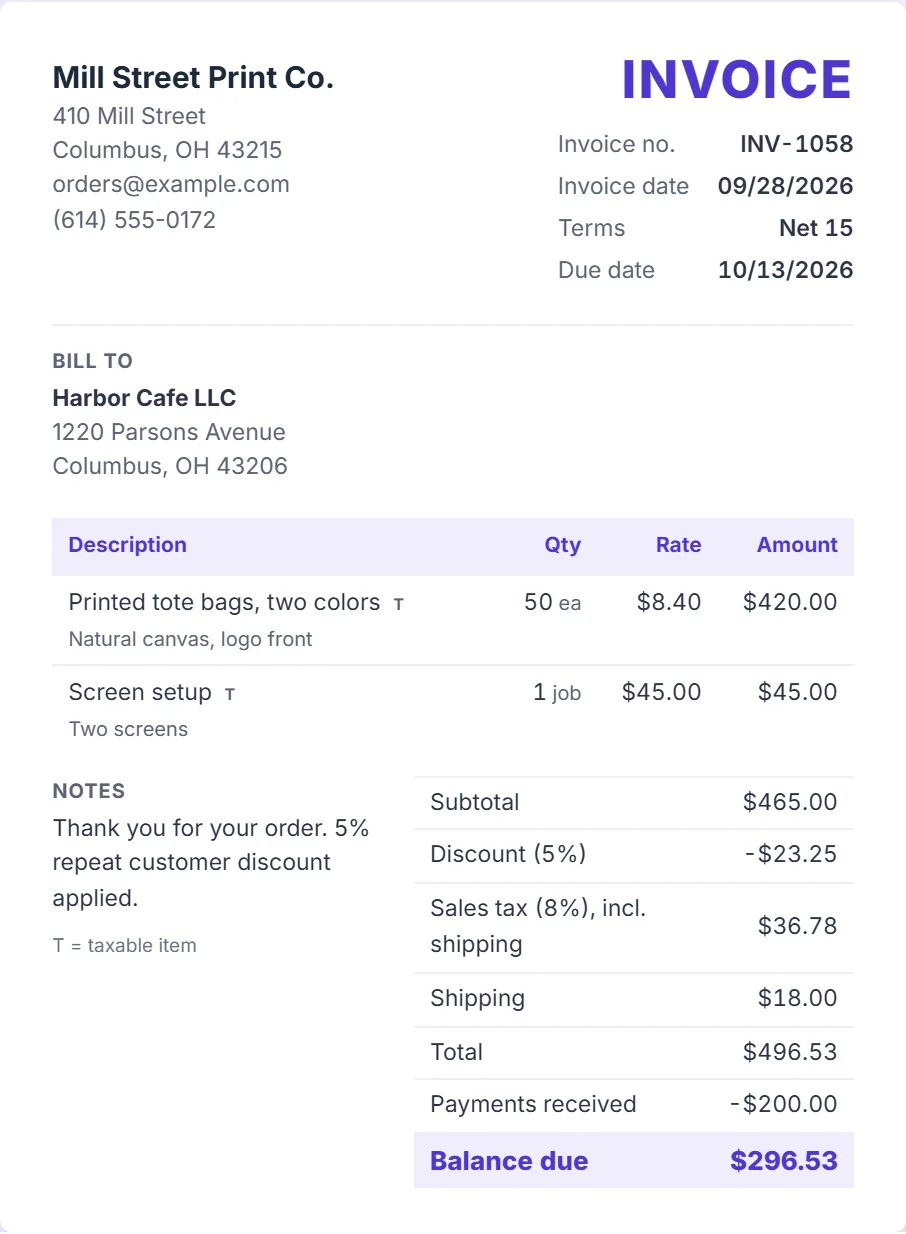
| Line | Amount |
|---|---|
| Printed tote bags, two colors, 50 ea at $8.40 | $420.00 |
| Screen setup, 1 job at $45.00 | $45.00 |
| Subtotal | $465.00 |
| Discount (5%) | -$23.25 |
| Delivery | $18.00 |
| Sales tax, 8% of $459.75 | $36.78 |
| Total | $496.53 |
| Deposit received | -$200.00 |
| Balance due, Net 15 (October 13, 2026) | $296.53 |
Why every line is taxed: Ohio counts charges for services needed to complete a sale, such as screen setup, and delivery charges as part of the taxable price, and a discount the seller gives reduces it (Ohio Revised Code 5739.01).
The cafe uses the bags itself. A buyer who resells them would give the seller an exemption certificate instead.
The 8% rate is Franklin County's combined state, county and transit rate from the Ohio Department of Taxation rate map. The business, client and prices are invented. Rules differ by state, so check yours before you copy the Taxable marks.
How is an invoice total calculated?
Each line is quantity times price, rounded to the cent. A discount comes off the subtotal and is shared across taxable and non-taxable lines in proportion to their amounts.
Sales tax is your rate times the discounted taxable lines, plus shipping when you tick the shipping box. Payments already received are subtracted to give the balance due.
In the example above, the 5% discount takes $23.25 off the $465.00 subtotal, tax is 8% of $459.75 including delivery, and the $200.00 deposit leaves $296.53 due. The same method runs the estimate and receipt generators; see how we calculate.
What do invoice payment terms mean?
Payment terms tell the client how long they have to pay. Pick one in the form and the due date is printed on the invoice.
| Terms | When payment is due |
|---|---|
| Due on receipt | Payment is expected as soon as the client receives the invoice. Common for small residential jobs. |
| Net 7, Net 10, Net 15 | Payment is due 7, 10 or 15 days after the invoice date. Common for freelancers and trades. |
| Net 30 | Payment is due 30 days after the invoice date. A common default for business clients. |
| Net 45, Net 60 | Longer terms that larger companies sometimes ask of their suppliers. |
If your agreement includes a late fee or an early payment discount, say so in the notes. Terms are easiest to enforce when the client agreed to them before the work started, for example in a quote or contract.
Due dates count calendar days, weekends included. What Net 30 means walks through due dates for each term, what happens when one lands on a weekend, and what 2/10 net 30 is worth.
How do sales tax, discounts and deposits work on an invoice?
Sales tax is worked out only on the lines you mark as taxable, after any discount, so you can tax parts and leave labor untaxed where your state allows it. The rules on what is taxable, and the rate, come from your state and sometimes your city or county.
Shipping has its own field. Many states, Ohio among them, tax delivery charges on taxable goods (Ohio Revised Code 5739.01), so tick Charge sales tax on shipping when yours does.
A discount can be a percentage of the subtotal or a fixed amount. Deposits go in Payments received, and the invoice shows the balance still due.
How should I number my invoices?
Give every invoice a unique number and never reuse one. A simple sequence such as INV-1001, INV-1002 works, and some businesses add the year or a client code. The number makes payments easy to match and helps if an invoice is ever disputed.
Keep the numbers in order in your own records, including invoices you later cancel, so there are no unexplained gaps. When a payment arrives, note the invoice number it settles.
How do I send an invoice?
Email the PDF to the person who pays, or to the accounts payable address a company gave you. Put the invoice number and amount in the subject line, such as "Invoice INV-1058, $296.53 due October 13, 2026" for the example above, so it is easy to find later.
Keep a copy of every invoice you send. If the due date passes, send a short reminder with the same PDF attached and the invoice number, and keep a note of each reminder in case the payment is disputed.
Invoice, estimate or receipt?
An estimate or quote prices the work before it starts. An invoice asks for payment once the work is done or at an agreed stage. A receipt confirms that a payment was received. Use the estimate generator for quotes and the receipt generator once you have been paid.
Invoice templates by industry
Start from a template with the line items and wording a trade usually needs, then change anything in the generator.
Sources
- IRS, What kind of records should I keep
- Ohio Revised Code 5739.01, definitions (price, delivery charges)
- Ohio Revised Code 5739.03, exemption certificates
- Ohio Department of Taxation, Sales and Use Tax Rate Map, total state and local rates by county, effective October 2026