Free W-2 Generator for 2026
A W-2 generator fills in Form W-2 for wages you paid an employee and prints the employee copies, B, C and 2, with the IRS instructions. This free W2 maker is fillable online and makes printable copies. For employers issuing W-2s to their own employees.
Reviewed by M. Humza. Checked against the IRS and SSA sources October 4, 2026. Fill in the form
Due to employees by February 1, 2027 and to the SSA by February 1, 2027. File Copy A through SSA Business Services Online or on the official scannable form.
What is Form W-2?
Form W-2, Wage and Tax Statement, is the form an employer uses to report each employee's wages for the year and the federal income, Social Security and Medicare taxes withheld from them. The employer gives the employee Copies B, C and 2 and files Copy A with the Social Security Administration.
What do I need to make a W-2?
- Your business name, address and EIN, exactly as on your payroll tax filings.
- The employee's name and address, and the last four digits of their SSN for the employee copies.
- The year's gross pay, reported tips, and pre-tax deductions such as 401(k) deferrals and cafeteria plan premiums, or the box totals from your payroll reports.
- The federal, Social Security and Medicare tax actually withheld.
- Any box 12 amounts, and the state and local wages, tax withheld and your state ID number.
How do I make a W-2 for an employee?
- Enter the employer. Name, address and EIN, exactly as on your payroll tax filings.
- Enter the employee. Name and address, and the last four digits of the SSN.
- Add the year's pay. Calculate boxes 1 and 3 to 6 from gross pay and pre-tax deductions, or enter them from your payroll reports.
- Add box 2 and anything else. Federal tax withheld, box 12 codes (including TP for tips and TT for overtime), state and local lines.
- Check and download. Compare the preview with your payroll totals, then download Copies B, C and 2.
- File Copy A. Submit it to the SSA through Business Services Online, which creates the Form W-3 for you, or on the official red form with a paper Form W-3.
Which W-2 copies go where?
| Copy | Goes to | Label on the form |
|---|---|---|
| Copy A | Social Security Administration | You file it, electronically or on the official scannable form. Not made here. |
| Copy B | Employee | Copy B, To Be Filed With Employee's FEDERAL Tax Return. |
| Copy C | Employee | Copy C, For EMPLOYEE'S RECORDS. |
| Copy 2 | Employee | Copy 2, To Be Filed With Employee's State, City, or Local Income Tax Return. |
| Copy 1 | State, city or local tax department | Copy 1, For State, City, or Local Tax Department. Optional in the generator. |
| Copy D | Employer | Copy D, For Employer. Optional in the generator. |
What does each box on a W-2 mean?
| Box | What goes in it |
|---|---|
| a | The employee's Social Security number. Employee copies may show only the last four digits. |
| b and c | The employer's EIN, name, address and ZIP code. |
| e and f | The employee's name and address. |
| 1 | Wages, tips and other compensation subject to federal income tax: gross pay plus reported tips and taxable fringe benefits, minus pre-tax retirement deferrals and cafeteria plan deductions. |
| 2 | Federal income tax actually withheld during the year. |
| 3 and 7 | Social Security wages and tips, together capped at the $184,500 wage base for 2026. Retirement deferrals are still included. |
| 4 | Social Security tax withheld, 6.2% of boxes 3 and 7. |
| 5 | Medicare wages and tips. There is no wage base cap. |
| 6 | Medicare tax withheld: 1.45% of box 5, plus 0.9% Additional Medicare Tax on wages over $200,000. |
| 10 | Dependent care benefits paid or provided. |
| 12 | Coded amounts. Common ones: D for 401(k) deferrals, W for HSA contributions, DD for the cost of employer health coverage and, new for 2026, TP for cash tips reported to you, TT for qualified overtime pay and TA for Trump account contributions. |
| 13 | Checkboxes for statutory employees, retirement plan participation and third-party sick pay. |
| 14a and 14b | Other information such as union dues or state disability tax in 14a. In 14b, up to two Treasury Tipped Occupation Codes when box 12 shows code TP. |
| 15 to 20 | State and local wages and income tax withheld, with the employer's state ID. |
Figures from the 2026 tax data we use across the site; see how we calculate. Box 12 codes and their meanings are listed in the 2026 General Instructions for Forms W-2 and W-3.
All 33 box 12 codes
Which codes count in box 1 and which only in boxes 3 and 5, and what the new codes TA, TP and TT mean, is in our guide to W-2 box 12 codes.
| Code | What it reports |
|---|---|
| A | Uncollected social security or RRTA tax on tips |
| B | Uncollected Medicare tax on tips (but not Additional Medicare Tax) |
| C | Taxable cost of group-term life insurance over $50,000 |
| D | Elective deferrals under a section 401(k) cash or deferred arrangement plan (including a SIMPLE 401(k) arrangement) |
| E | Elective deferrals under a section 403(b) salary reduction agreement |
| F | Elective deferrals under a section 408(k)(6) salary reduction SEP (this includes elective deferrals made to a Roth SEP IRA) |
| G | Elective deferrals and employer contributions (including nonelective deferrals) to a section 457(b) deferred compensation plan |
| H | Elective deferrals to a section 501(c)(18)(D) tax-exempt organization plan |
| J | Nontaxable sick pay |
| K | 20% excise tax on excess golden parachute payments |
| L | Substantiated employee business expense reimbursements |
| M | Uncollected social security or RRTA tax on taxable cost of group-term life insurance over $50,000 (former employees only) |
| N | Uncollected Medicare tax on taxable cost of group-term life insurance over $50,000 (but not Additional Medicare Tax) (former employees only) |
| P | Excludable moving expense reimbursements paid directly to a member of the U.S. Armed Forces or intelligence community |
| Q | Nontaxable combat pay |
| R | Employer contributions to an Archer MSA |
| S | Employee salary reduction contributions under a section 408(p) SIMPLE plan (this includes salary reduction contributions made to a Roth SIMPLE IRA) |
| T | Adoption benefits |
| V | Income from exercise of nonstatutory stock option(s) |
| W | Employer contributions (including employee contributions through a cafeteria plan) to an employee's health savings account (HSA) |
| Y | Deferrals under a section 409A nonqualified deferred compensation plan |
| Z | Income under a nonqualified deferred compensation plan that fails to satisfy section 409A |
| AA | Designated Roth contributions under a section 401(k) plan |
| BB | Designated Roth contributions under a section 403(b) plan |
| DD | Cost of employer-sponsored health coverage |
| EE | Designated Roth contributions under a governmental section 457(b) plan |
| FF | Permitted benefits under a qualified small employer health reimbursement arrangement |
| GG | Income from qualified equity grants under section 83(i) |
| HH | Aggregate deferrals under section 83(i) elections as of the close of the calendar year |
| II | Medicaid waiver payments excluded from gross income under Notice 2014-7 |
| TA | Employer contributions under a section 128 Trump account contribution program paid to a Trump account of an employee or a dependent of an employee |
| TP | Total amount of cash tips reported to the employer |
| TT | Total amount of qualified overtime compensation |
What is new on the 2026 W-2?
For 2026, employers report the total cash tips an employee reported to them in box 12 with code TP, and the employee's Treasury Tipped Occupation Code in box 14b. Qualified overtime pay goes in box 12 with code TT. Employees use these amounts for the tips and overtime deductions on Schedule 1-A.
| Box 12 code | What it reports |
|---|---|
| TP | Total amount of cash tips reported to the employer |
| TT | Total amount of qualified overtime compensation |
| TA | Employer contributions under a section 128 Trump account contribution program paid to a Trump account of an employee or a dependent of an employee |
In the generator, add these in the box 12 section. When you enter tips, the form reminds you to add code TP and the occupation code. Wording from the 2026 General Instructions for Forms W-2 and W-3.
Example: a W-2 for a bakery employee
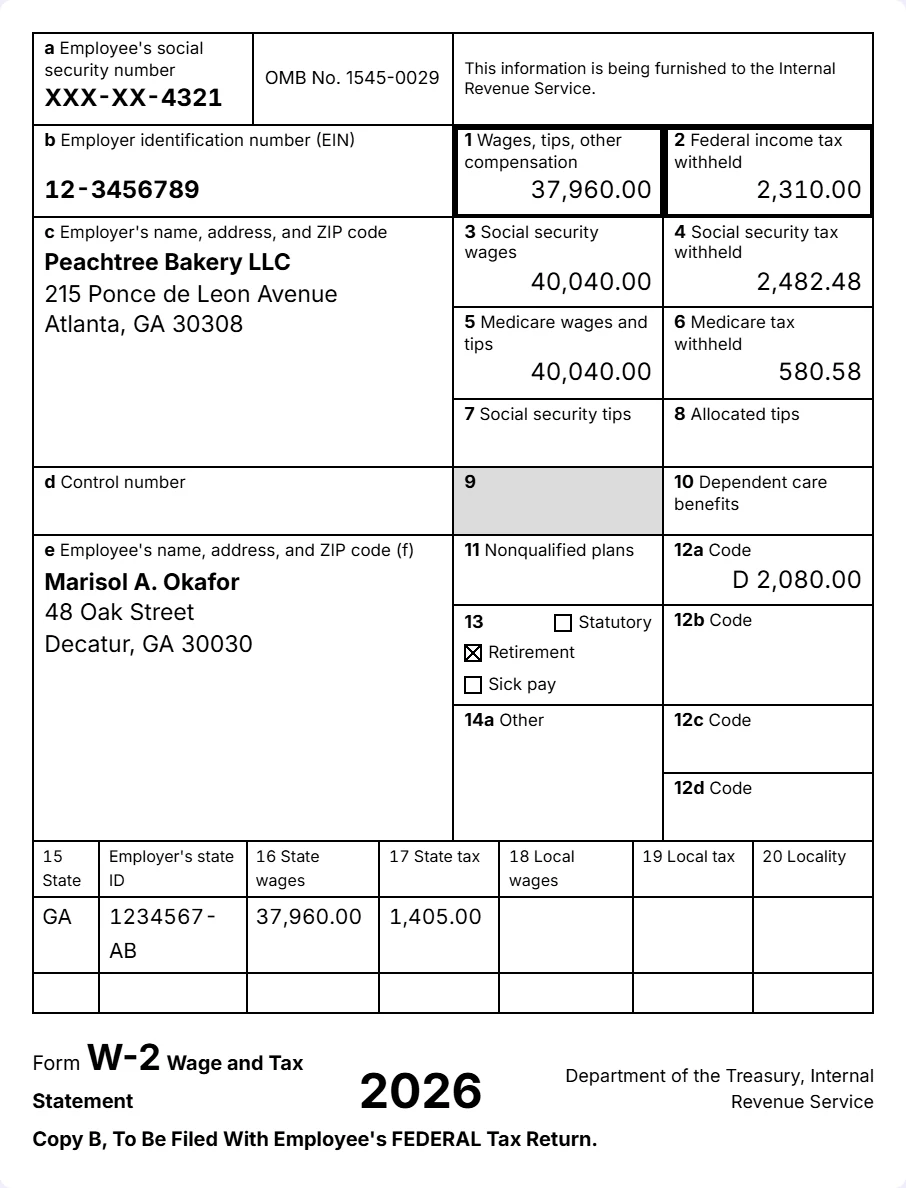
Peachtree Bakery LLC in Atlanta paid Marisol A. Okafor $41,600.00 in wages in 2026. Marisol put $2,080.00 into the bakery's 401(k) and paid $1,560.00 of health insurance premiums through its cafeteria plan, and $2,310.00 of federal income tax was withheld.
Box 1 is the wages minus both deductions: $37,960.00. Boxes 3 and 5 take off only the cafeteria plan premiums, because 401(k) deferrals still count for Social Security and Medicare: $40,040.00.
Box 4 is 6.2% of that, $2,482.48, and box 6 is 1.45%, $580.58. The deferral goes in box 12 with code D, and the Retirement plan box is ticked.
Can I give employees a W-2 I print myself?
Yes. Publication 1141 sets the rules for substitute W-2 employee copies: black ink on white paper, boxes 1 to 6 in the upper right in the official order, and the form number, title and tax year together with the Treasury line.
It also asks for the copy labels, bold boxes 1 and 2 on Copy B, the notice on Copy C and the employee instructions from the back of the official copies. This PDF includes all of them.
Can I file a Copy A that I print myself?
No. The 2026 Form W-2 notes that Copy B and the other black copies may be downloaded, completed, printed and used to give the information to the employee. Copy A is different: the printable version cannot be scanned.
File Copy A electronically through SSA Business Services Online or on the official scannable form, which you can order from the IRS. If you file 10 or more information returns in total, you must file electronically.
When are 2026 W-2s due?
Give Copies B, C and 2 to each employee by February 1, 2027, and file Copy A with the SSA by February 1, 2027, with Form W-3 if you file on paper.
If you file 10 or more information returns in total, you must e-file. SSA Business Services Online is the SSA's own filing service, and it creates the Form W-3 for you.
Who can make a W-2?
Only the employer that paid the wages, or a payroll provider or accountant working for it. An employee cannot make their own W-2: it has to come from the employer, and a lost one is replaced by the employer or an IRS wage and income transcript.
Household employers count too. Someone who pays a nanny or housekeeper files a W-2 for each household employee paid $3,000 or more in Social Security and Medicare wages, or whose wages had federal income tax withheld, and reports the taxes on Schedule H (Publication 926).
Do I need a W-2 or a 1099?
Use Form W-2 for an employee. Use Form 1099-NEC for an independent contractor you paid $2,000 or more for services in 2026. A contractor gets no W-2 and has no tax withheld unless backup withholding applies.
If you are not sure which a worker is, the IRS explains the test in independent contractor or employee, and our guide to W-2 vs 1099 compares the two side by side. For contractors, use the 1099 generator.
Calculate or enter the figures?
Calculate from pay suits a small employer with simple payroll: enter the year's gross wages, reported tips, retirement deferrals and cafeteria plan deductions, and boxes 1, 3, 4, 5 and 6 follow the federal rules.
Enter from payroll suits anyone with payroll reports: type each box, and the generator warns when box 4 or 6 does not match the rates.
Either way, box 2 is the federal income tax actually withheld during the year. The last pay stub of the year shows it in the YTD column; the YTD guide explains how those totals build up.
How do employers fill in a W-2 from pay stubs?
This is for employers. An employee cannot turn a pay stub into a W-2; ask the employer for it instead.
Employers without payroll reports can take the W-2 figures from each employee's last pay stub of the year. Its year-to-date column holds the totals, provided every pay date in the year is included.
| W-2 box | Where it comes from on the final pay stub |
|---|---|
| 1 | YTD gross pay minus YTD pre-tax retirement deferrals and cafeteria plan deductions (often printed as FIT taxable wages) |
| 2 | YTD federal income tax (FIT) withheld |
| 3 and 5 | YTD gross wages minus cafeteria plan deductions only; retirement deferrals stay in. Box 3 excludes tips (they go in box 7) and stops at the wage base; box 5 includes tips |
| 4 and 6 | YTD Social Security and Medicare withheld |
| 12 | YTD 401(k) deferrals as code D, HSA contributions through payroll as code W |
| 16 and 17 | YTD state taxable wages and state income tax withheld |
Check the YTD totals against what was actually paid before you copy them. A stub with a missed or corrected pay run carries the error into every box, and box 4 should equal boxes 3 and 7 times the Social Security rate, give or take a few cents of rounding.
Corrections and state copies
To correct a W-2 you already filed, use Form W-2c, Corrected Wage and Tax Statement: file it with the SSA and give the employee the corrected copies. This generator makes original W-2s only. The 2026 General Instructions for Forms W-2 and W-3 explain when and how to file a W-2c.
Most states with an income tax also require employers to report W-2 wages to the state revenue department, under their own rules and deadlines, so check your state's employer withholding pages. Copy 1, an option in this generator, is the copy for a state, city or local tax department.
Frequently asked questions
Is this W-2 generator free?
Is there a printable or fillable W-2 form?
Can I give employees a W-2 printed from this generator?
Can I file Copy A from this PDF?
When are 2026 W-2s due?
I lost my W-2. Can I make one here?
What is the difference between a W-2 and a W-4?
Why does the W-2 show only the last four digits of the SSN?
Can I add my company logo?
Does the 2026 W-2 report tips and overtime?
Sources and review
Reviewed by M. Humza against the official sources below, last checked October 4, 2026. The figures, dates and box captions on this page and in the generator are read from the same data file.
- IRS Form W-2 (2026), Wage and Tax Statement, including Notice to Employee and Instructions for Employee
- General Instructions for Forms W-2 and W-3 (2026), box 12 code reference guide
- IRS Publication 1141 (Rev. August 2026), General Rules and Specifications for Substitute Forms W-2 and W-3
- IRS Publication 926 (2026), Household Employer's Tax Guide, Form W-2 and Schedule H
- SSA Contribution and Benefit Base
- IRS Topic 751, Social Security and Medicare withholding rates
This page is general information about the form, not tax advice. For your own situation, check the IRS instructions or ask a tax professional.