1. Home
  2. Tools
  3. Pay Stub Generator
Payroll records

Free Pay Stub Generator

Make a pay stub, also called a check stub: enter your details, check the live preview, and download a clean PDF. No signup, no watermark.

Free to useNo signup requiredDownload instantly
Taxes calculated for the 2026 tax year. How we calculate
  1. 1Enter details
  2. 2Review preview
  3. 3Download PDF
1

Enter pay stub details

Pay stub type

Latest period: 01/12/2026 to 01/25/2026.

Company
Employee
Earnings
$
$
$
$

Bonus, commission and tips apply to the latest pay date only.

2Taxesoptional
$
$
%
%

Select the employee's state to set up state tax.

3Deductions and year to dateoptional
%
$

Filled in from the pay date. Change it if employment started later in the year. YTD assumes the same hours and pay each period; bonus, commission and tips count only on the latest pay date.

How do I make a pay stub?

Fill in the form above in five steps. The preview updates as you type, and the PDF is made on your device.

  1. Choose the pay stub type. Hourly, salaried, or a 1099 earnings statement for contractors.
  2. Add company and employee details. Only the last 4 digits of an SSN are ever shown.
  3. Enter earnings. Hours and rate, salary, or the contract payment, plus any bonus or tips.
  4. Check taxes and deductions. Use automatic estimates or enter the exact amounts from payroll.
  5. Download. Confirm the figures are real and download a clean PDF with no watermark.
The five steps above on screen, with narration and captions (1:41). The business and employee are invented. More videos on our YouTube channel.

What is a pay stub, and what does it show?

A pay stub, also called a check stub or earnings statement, is the record an employer gives with each paycheck. It shows how gross pay became net pay for that pay period.

It lists gross pay for the period, each tax withheld (federal income tax, Social Security, Medicare, state and local tax), deductions such as 401(k) or health insurance, and net pay. Year-to-date (YTD) columns show the running totals since January 1. Our annotated examples walk through each line, and the guide on how to make a check stub shows the order to calculate them in by hand.
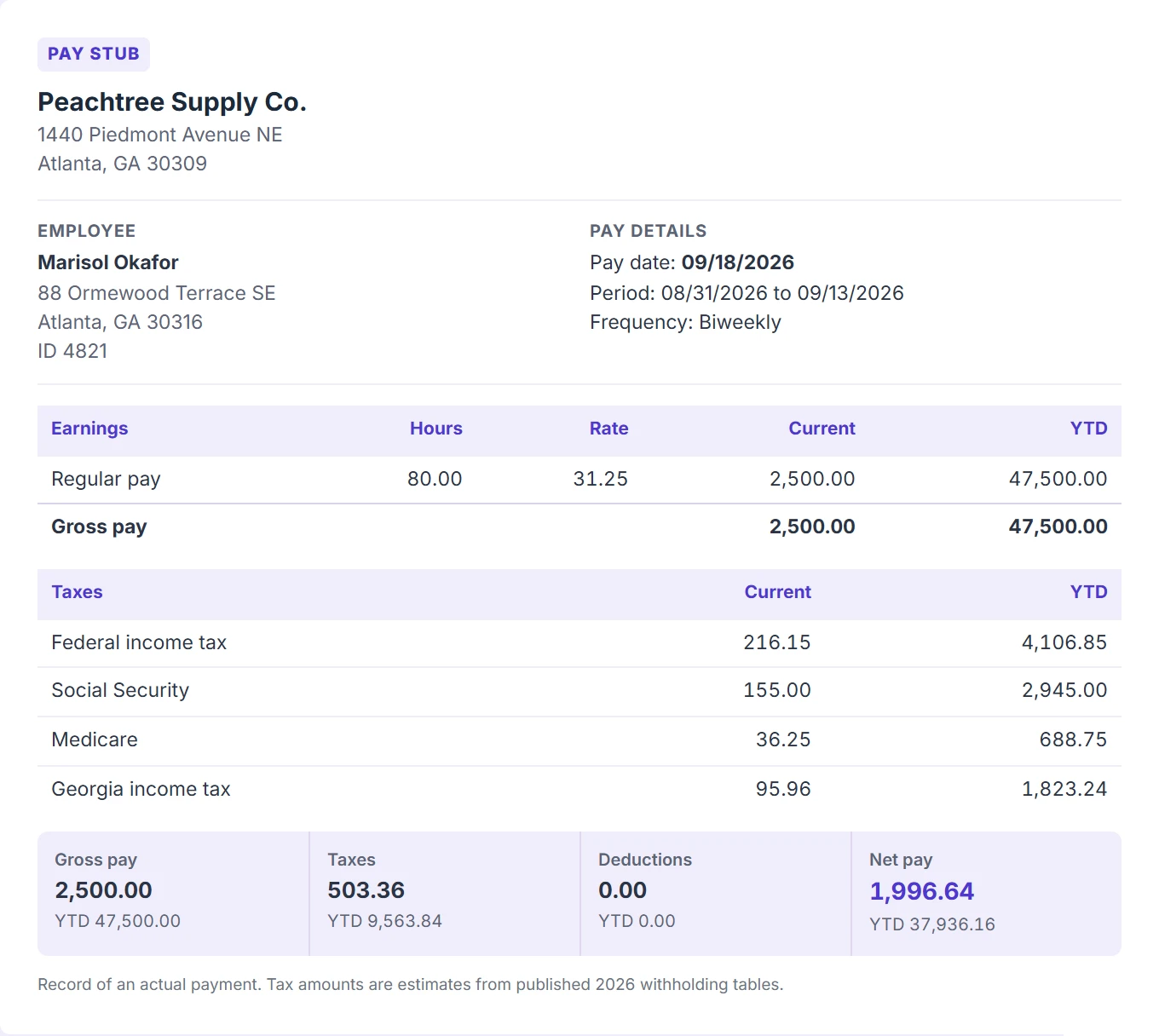
Sample biweekly pay stub for an hourly employee in Georgia with federal, Social Security, Medicare and state tax
A sample biweekly stub for an hourly employee in Georgia, calculated by this generator for the 2026 tax year. The names are made up.

How do hourly, salaried and 1099 stubs differ?

Hourly employees get a Regular pay line with hours and rate, plus an Overtime line at 1.5 times the rate when overtime hours are entered. Salaried employees get a Salary line equal to the annual salary divided by the pay periods in the year: 52 weekly, 26 biweekly, 24 semimonthly or 12 monthly. 1099 contractors get an earnings statement with no withholding; read more on the 1099 pay stub generator page.

Which layouts and colors can I choose?

Choose Classic (stacked tables with a summary bar), Horizontal (a short landscape-style earnings statement) or Long with deposit advice (a non-negotiable advice slip above the stub), each in Plum, Blue, Green, Navy or Black and white. Preview all three on the pay stub templates page.

Does the generator calculate state tax?

Select the work state in the form. States with published withholding tables in our engine are calculated automatically; for the others, enter the state withholding rate that applies. States with no income tax on wages show a zero state line.

AlabamarateAlaskano taxArizonarateArkansasrateCaliforniarateColoradorateConnecticutrateDelawarerateDistrict of ColumbiarateFloridano taxGeorgiaautoHawaiirateIdahorateIllinoisrateIndianarateIowarateKansasrateKentuckyrateLouisianarateMainerateMarylandautoMassachusettsrateMichiganrateMinnesotarateMississippirateMissouriautoMontanarateNebraskarateNevadano taxNew Hampshireno taxNew JerseyrateNew MexicorateNew YorkrateNorth CarolinarateNorth DakotarateOhioautoOklahomaautoOregonratePennsylvaniarateRhode IslandrateSouth CarolinarateSouth Dakotano taxTennesseeno taxTexasno taxUtahrateVermontrateVirginiarateWashingtonno taxWest VirginiarateWisconsinrateWyomingno tax

Where do the tax figures come from?

Automatic mode reads the 2026 figures from versioned data files reviewed by M. Humza, last checked September 24, 2026. The federal figures rest on these official sources; how we calculate lists every state table too.

Use only for real payments you made or received. Creating documents with false information may be illegal. Read our acceptable use policy.

Frequently asked questions

Is this pay stub generator free?
Yes. Create and download pay stubs for free, with no signup and no watermark. All three layouts and five colors are included.
Is my information saved?
No. The pay stub is built in your browser and the PDF is created on your device. Nothing you type is sent to our servers.
How are taxes calculated?
Automatic mode uses the IRS Publication 15-T percentage method for federal withholding with your W-4 details, the current Social Security and Medicare rates and wage base, and published state tables for the states in our engine (a rate you enter for the others). For exact numbers from your payroll system, switch to Enter manually. See how we calculate for the 2026 sources.
Can I make more than one pay stub at a time?
Yes. Choose up to six stubs and the generator produces consecutive pay dates ending on the date you enter, with year-to-date totals carried from one to the next, in a single PDF.
Can a 1099 contractor get a pay stub?
Contractors usually do not receive employer pay stubs. The 1099 option creates an earnings statement for payments actually received, with no taxes withheld.
Is it legal to use this pay stub generator?
Yes, for real payments: an employer documenting wages it paid or a self-employed person documenting income received. Entering income or an employer that is not real and showing the result to a lender or landlord is fraud. Read the legal guide.